Thursday, March 07, 2013

Java 7 Locale Changes impacting Double.parseDouble() for some European Locales

Details on the Java 7 Locale related changes and its impact is captured succinctly at: http://blog.ej-technologies.com/2011/12/default-locale-changes-in-java-7.html 


A fix for the old code using Double.parseDouble() method which used to work fine with European locales like French (fr) and German (de) are broken since the parseDouble() method considers the value being passed to it to be in English format whereas a decimal value in French/German is represented with a comma and not a dot thus leading to a NumberFormatException. Prior to Java 7, the behavior for parseDouble() method was to expect the value to be in the current locale and not en_US.

A fix to the above issue is:

Locale loc = Locale.getDefault(Locale.Category.FORMAT); // get current locale
NumberFormat nf = NumberFormat.getNumberInstance(loc); // get number format for current locale
DecimalFormat df = (DecimalFormat)nf;
df.applyPattern(“#.##”); 
 
//Then replace occurrence of Double.parseDouble(df.format(c)) with the following:
 
Number number = nf.parse(df.format(c)); // parse the decimal string for current locale
System.out.println("Formt using NumberFormat "+ number.doubleValue());


According to Oracle, this is not a bug but a feature enhancement - http://bugs.sun.com/bugdatabase/view_bug.do?bug_id=7073906 


The enhancement was done to have the flexibility to write multi-lingual applications (applications showing data in more than one locale). Earlier entire application would default to just one selected locale.

Tuesday, March 05, 2013

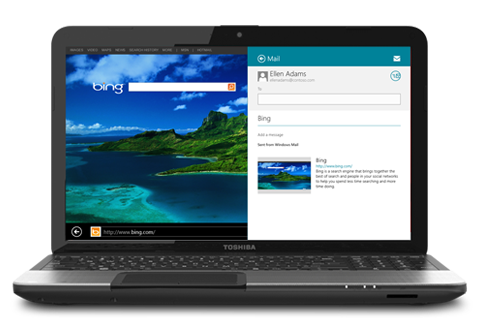
Linux Mint 14 XFCE notebook


I got a Toshiba Satellite C855-S5194 notebook in a deal recently and installed Linux Mint 14 with Cinnamon and XFCE desktop.

This notebook came very cheap (for $330) and has Intel i3 processor which is dual core 2.5 GHz clock speed and has 6GB RAM (expandable upto 16GB), 650GB HDD and other usual stuff. I initially started with Cinnamon for my desktop but soon discovered that it was too heavy weight for my modest notebook so i installed Xubuntu desktop and noted that there was a significant performance improvement (CPU remains < 10%) with several applications like the email client, the browser with several tabs, the terminal sessions and the Eclipse IDE running simultaneously.

For more details on this notebook see:
http://us.toshiba.com/computers/laptops/satellite/C850/C855-S5194/

The build quality is pretty average (so handle with some gentleness :)) but i am amazed at the performance of the i3 processor which has hyper-threading support and so it shows up with 4 CPU threads in the system monitor.

In short, if you are looking for a Linux notebook which mostly sits like desktop but nevertheless gives some portability and performs well and comes at a low cost then this Toshiba notebook is a very decent option.

I did not keep Windows 8 (which this notebook came with pre-installed) for long so cannot comment on how well it performed but for the short while that i did have it, it seemed to be working smoothly, before it got erased by ubuntu first and then by linux mint eventually (after i figured out how to work around the secure boot and UEFI BIOS mode which did not let linux mint to boot from DVD).

By default the notebook had secure BIOS enabled and Boot mode set to UEFI. This will not let the Linux mint 14 to boot from DVD even after specifying DVD first in the boot order. Ubuntu does not have this limitation as its OS image is UEFI compatible and hence there was no issue in booting from an Ubuntu DVD. But for Linux Mint i needed to:

  1. Disable "Secure BIOS".
  2. Change Boot Mode from "UEFI boot" to "CSM boot".
After this it goes to legacy boot mode and booting from Linux Mint DVD will work fine and then you can proceed with installation.

Wednesday, January 23, 2013

Book Review: The Pragmatic Programmer: From Journeyman to Master

This is a nice book on the now common-place wisdom of programming or software engineering discipline. As a software engineer for 13 years I found it not so useful but nevertheless good in reviewing what are today well understood and common practices in the industry like the DRY principle (Don’t repeat yourself), Fix the broken windows today, refactoring etc. I highlighted some points as I was reading this book and I am reproducing them below (more for myself to be able to review these once in a while):

  1. Every day, work to refine the skills you have and to add new tools to your repertoire.
  2. The greatest of all weaknesses is the fear of appearing weak. • J. B. Bossuet, Politics from Holy Writ, 1709
  3. Don't leave "broken windows" (bad designs, wrong decisions, or poor code) unrepaired. Fix each one as soon as it is discovered.
  4. People find it easier to join an ongoing success. Show them a glimpse of the future and you'll get them to rally around.
  5. It's often the accumulation of small things that breaks morale and teams.
  6. Striving to better, oft we mar what's well. • King Lear 1.4
  7. As Ed Yourdon described in an article in IEEE Software [You95], you can discipline yourself to write software that's good enough—good enough for your users, for future maintainers, for your own peace of mind. You'll find that you are more productive and your users are happier. And you may well find that your programs are actually better for their shorter incubation.
  8. We are simply advocating that users be given an opportunity to participate in the process of deciding when what you've produced is good enough.
  9. Great software today is often preferable to perfect software tomorrow. If you give your users something to play with early, their feedback will often lead you to a better eventual solution.
  10. Don't spoil a perfectly good program by over-embellishment and over-refinement. Move on, and let your code stand in its own right for a while. It may not be perfect. Don't worry: it could never be perfect.
  11. An investment in knowledge always pays the best interest. • Benjamin Franklin
  12. Learn at least one new language every year.
  13. Read a technical book each quarter.
  14. Once you're in the habit, read a book a month.
  15. After you've mastered the technologies you're currently using, branch out and study some that don't relate to your project.
  16. Read nontechnical books, too.
  17. Take classes.
  18. Participate in local user groups.
  19. Start learning a new language this week.
  20. Start reading a new book
  21. Get out and talk technology with people who aren't involved in your current project, or who don't work for the same company. Network in your company cafeteria, or maybe seek out fellow enthusiasts at a local user's group meeting.
  22. I believe that it is better to be looked over than it is to be overlooked.
  23. You're communicating only if you're conveying information.
  24. Encourage people to talk by asking questions, or have them summarize what you tell them.
  25. Always respond to e-mails and voice mails, even if the response is simply "I'll get back to you later." Keeping people informed makes them far more forgiving of the occasional slip, and makes them feel that you haven't forgotten them.
  26. Where possible, always use accessor functions to read and write the attributes of objects.
  27. Two or more things are orthogonal if changes in one do not affect any of the others.
  28. Our preference is to start by separating infrastructure from application. Each major infrastructure component (database, communications interface, middleware layer, and so on) gets its own subteam. Each obvious division of application functionality is similarly divided. Then we look at the people we have (or plan to have) and adjust the groupings accordingly.
  29. There is an easy test for orthogonal design. Once you have your components mapped out, ask yourself: If I dramatically change the requirements behind a particular function, how many modules are affected? In an orthogonal system, the answer should be "one."
  30. Prototyping generates disposable code. Tracer code is lean but complete, and forms part of the skeleton of the final system.
  31. Prototyping is a learning experience. Its value lies not in the code produced, but in the lessons learned
  32. We think it's a great idea to record your estimates so you can see how close you were.
  33. Iterate the Schedule with the Code
  34. To ensure that we never lose any of our precious work, we should always use a Source Code Control system—even for things such as our personal address book!
  35. you can't be a great programmer until you become highly skilled at Debugging.
  36. Keep Knowledge in Plain Text
  37. Clearly the list could go on. The shell commands may be obscure or terse, but they are powerful and concise. And, because shell commands can be combined into script files (or command files under Windows systems), you can build sequences of commands to automate things you do often. Tip 21 Use the Power of Command Shells.
  38. Ideally, the shell you use should have keybindings that match the ones used by your editor. Bash, for instance, supports both vi and emacs keybindings.
  39. Choose an editor, know it thoroughly, and use it for all editing tasks.
  40. As one of the new languages you are going to learn this year, learn the language your editor uses. For anything you find yourself doing repeatedly, develop a set of macros (or equivalent) to handle.
  41. Try to accomplish any given editing task in as few keystrokes as possible.
  42. Progress, far from consisting in change, depends on retentiveness. Those who cannot remember the past are condemned to repeat it. • George Santayana, Life of Reason
  43. sounds simple, but in explaining the problem to another person you must explicitly state things that you may take for granted when going through the code
  44. Debugging Checklist -
    1. Is the problem being reported a direct result of the underlying bug, or merely a symptom?
    2. Is the bug really in the compiler?
    3. Is it in the OS? Or is it in your code?
    4. If you explained this problem in detail to a coworker, what would you say?
    5. If the suspect code passes its unit tests, are the tests complete enough?
    6. What happens if you run the unit test with this data?
    7. Do the conditions that caused this bug exist anywhere else in the system?
  45. Learn a Text Manipulation Language like perl.
  46. Good fences make good neighbors. • Robert Frost, "Mending Wall"
  47. Organize your code into cells (modules) and limit the interaction between them. If one module then gets compromised and has to be replaced, the other modules should be able to carry on.
  48. Traversing relationships between objects directly can quickly lead to a combinatorial explosion[1] of dependency relationships.
  49. We want to configure and drive the application via metadata as much as possible. Our goal is to think declaratively
  50. We need to allow for concurrency[3] and to think about decoupling any time or order dependencies. In doing so, we can gain flexibility and reduce any time-based dependencies in many areas of development: workflow analysis, architecture, design, and deployment.
  51. All functions related to the fulfillment of business logic fall into the category of core concerns.
  52. You can support multiple views of the same data model. You can use common viewers on many different data models. You can even support multiple controllers to provide nontraditional input mechanisms.
  53. Model. The abstract data model representing the target object. The model has no direct knowledge of any views or controllers. View. A way to interpret the model. It subscribes to changes in the model and logical events from the controller. Controller. A way to control the view and provide the model with new data. It publishes events to both the model and the view. Let's look at a nongraphical
  54. Each model may have many viewers, and one viewer may work with multiple models.
  55. Use Blackboards to Coordinate Workflow
  56. Network monitoring tool. The system gathers performance statistics and collects trouble reports. You'd like to implement some agents to use this information to look for trouble in the system.
  57. Sometimes we come up with fairly complex O() functions, but because the highest-order term will dominate the value as n increases, the convention is to remove all low-order terms, and not to bother showing any constant multiplying factors. O(n2/2+ 3n) is the same as O(n2/2), which is equivalent to O(n2).
  58. Rewriting, reworking, and re-architecting code is collectively known as refactoring.
  59. Workflow can be captured with UML activity diagrams, and conceptual-level class diagrams can sometimes be useful for modeling the business at hand.
  60. Teams as a whole should not tolerate broken windows—those small imperfections that no one fixes. The team must take responsibility for the quality of the product, supporting developers who understand the no broken windows philosophy.
  61. Make sure everyone actively monitors the environment for changes. Maybe appoint a chief water tester. Have this person check constantly for increased scope, decreased time scales, additional features, new environments—anything that wasn't in the original agreement.
  62. Divide your people into small teams, each responsible for a particular functional aspect of the final system. Let the teams organize themselves internally, building on individual strengths as they can.
  63. The project needs at least two "heads"—one technical, the other administrative. The technical head sets the development philosophy and style, assigns responsibilities to teams, and arbitrates the inevitable "discussions" between people. The technical head also looks constantly at the big picture, trying to find any unnecessary commonality between teams that could reduce the orthogonality of the overall effort. The administrative head, or project manager, schedules the resources that the teams need, monitors and reports on progress, and helps decide priorities in terms of business needs.
  64. To ensure that things get automated, appoint one or more team members as tool builders to construct and deploy the tools that automate the project drudgery. Have them produce makefiles, shell scripts, editor templates, utility programs, and the like.
  65. Remember that teams are made up of individuals. Give each member the ability to shine in his or her own way. Give them just enough structure to support them and to ensure that the project delivers against its requirements.
  66. Civilization advances by extending the number of important operations we can perform without thinking. • Alfred North Whitehead

Book Review: MY INVENTIONS: The Autobiography of Nikola Tesla

This book by Nikola Tesla is a quick read and does not go very detailed into his inventions like some biographies on Tesla do. It still has some lessons that Tesla conveys throughout the book on what he thought was different than normal in him and a one very unique thing that he says towards the end of the book is – when someone does bad to him then almost always he finds that person starts to pay for his deeds and he thought as if there is a mental influence one can have on others lives which he experienced but could not prove it to others but was very convinced that it was his mind that was causing his tormentor sufferings. Following are some things I remember:

  1. At one point Tesla says: When natural inclination develops into a passionate desire, one advances towards his goal in seven-league boots.
  2. He had been through near death experiences several times in his life.
  3. He had very sharp hearing capacity – but because of this he was not able to bear even sounds which may appear normal for most people.
  4. He was very inspired by reading works of Mark Twain once when he was very sick and bed-ridden. When he came to America and happened to befriend Mr Clemens himself who Tesla describes to be a man of very jovial nature and tells the author that his books were the reason he could recover from his sickness as they gave him the strength to live then at hearing this Mark Twain (Mr Clemens) started to cry like a child and said it was the greatest reward for him.
  5. Of note, Tesla does not say anything about Edison (or not that I remember now so even if he did it was only done in the passing).

A good quick read and an inspiring one at that. Highly recommended.

Sunday, December 16, 2012

Book Reviews: Life of Pi and The Lost Symbol


  1. Life of Pi: Story of survival in the pacific ocean of a boy, named Pi Patel, with a strange companion (a tiger, who was called Richard Parker). The story is being narrated by the man Pi Patel who lives in Canada and is being interviewed by the author (Yann Martel). The story starts from Pondicherry where the boy Pi and his brother live with their parents. Pi’s father runs a zoo in Pondicherry but during the country-wide emergency (as declared by the then Congress government led by Mrs. Indira Gandhi) the zoo was under pressure to become state-owned and so Pi’s father decides to immigrate to Canada and also sell his zoo animals to American and Canadian zoos. So Pi and his family board a Japanese ship to cross the pacific ocean and go to Canada. Just a few days into their journey there comes a storm while their ship is near the deepest part of the ocean and the ship was badly damaged and it sinks. Pi was put on a life boat on which there were a few others – all zoo animals – a hyena, a zebra and a tiger and they were soon joined by a orangutan. The author then recounts how the hunger makes the animals to kill the weaker among them and in the end only the boy (due to his intelligence) and the tiger (due to its strength) were the only once who survived on the boat. Then there are some interesting experiences that Pi has during his struggle for survival which is very well told by the author and keeps the reader engaged. I also watched the movie made on the book by Ang Lee (and is nominated for Best Picture in golden globe awards ceremony) and it was a beautiful movie which has made nice use of CGI wizardry to create the imaginary world of the story of Pi into a believable real-like experience which the kids are sure to get awe-inspired by. Overall a 4 star book ( I am reserving the one star as I have read one more very interesting story of survival called Papillon by Henry Charriere which to me was the best and Life of Pi being a short story in comparison does not surpass Papillon’s story).
  2. The Lost Symbol: This the most recent story of Robert Langdon (the Harward Symbologist) who is the hero of Dan Brown’s several other novels and falls short of being as interesting as the those other stories of Langdon (so I give it a 4 star) however its still a very readable story about the secret of ancient mysteries which are supposedly hidden in Washington D.C. As always, Dan Brown’s research on the background for the book pertaining to the Masonic heritage of some of the founding fathers of the country are thorough.

Sunday, November 04, 2012

Setting up wireless video surveillance with DVR

I setup video surveillance recently with the following gadgets:

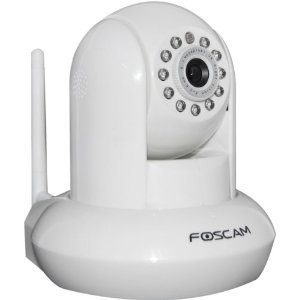
  • Foscam FI8910W Wireless/Wired Pan & Tilt IP/Network Camera with IR-Cut Filter for True Color Images - 8 Meter Night Vision and 3.6mm Lens (67° Viewing Angle) – White = $89

  • Uniden UDW20055 7” LCD Indoor/Outdoor Wireless Video System, Remote, 500ft Encrypted = $250 (however I got refurb one at $150) – it comes with 2 wireless cameras and 1 LCD monitor

It comes with a Uniden Surveillance System software that can do continuous video recording and save to disk (DVR function, of course, you will need to have a PC and spare storage space to save the recordings). You can time the recordings to delete after n number of days.

  • Foscam Pro: Two Way Audio and Recording, v2.0 App for iPhone ($6) – this enables discovering

One interesting experience I had was I learned the hard way that if your router is behind a VOIP phone adapter then port forwarding cannot work and I wasted quite sometime before I realized this fact and put the phone adapter (from Vonage) behind the router (so now modem line goes to router and then phone adapter connects to the router on one of its wired ports).

Saturday, October 27, 2012

Upgraded to Windows 8 Pro

Microsoft has taken a bold step towards removing the start menu from Windows 8. However that is not a big deal as it was made out to be by the media prior to the launch. The upgrade process from Windows 7 home premium to Windows 8 Pro for mere $40 was awesome. The upgrade goes through very smoothly and Windows 8 is quite fluid and fast. The metro look and feel is very effective and looks good. The tiles on the screen could be better utilized on a touch screen tablet or touch sensitive monitors. For a regular desktop use you may not feel much of a hassle in getting used to the tiled start screen. On the bottom left there is a tile to take you to desktop mode and that's it - ones there it is as usual. I used to use launchy (which continues to work even after the upgrade) for accessing any program in the start menu and rarely had the need to go to the start menu so for me it is much the same as before. So did you like Windows 8 Pro - feel free to leave your comments.

Tuesday, October 02, 2012

Installing VMware Tools on Ubuntu Guest OS

VMware Tools are binaries that are guest OS dependent and need to be installed on the VM after the guest OS has been installed. The tools are required to see the IP addresses assigned for the network interfaces of the VM (among other things).

Following are the steps:

  1. Power on the VM.
  2. Once the guest OS has booted up, go to the VM > Guest > Install/Upgrade VMware Tools menu.
  3. This will put the VMware Tools directory under /media directory in Ubuntu.
  4. cd /media/VMware Tools
  5. cp /media/VMware Tools/VMware*tar.gz /tmp
  6. cd /tmp
  7. tar xvzf VMware*.tar.gz
  8. cd vmware-tools-distrib/
  9. sudo ./vmware-install.pl
  10. When the installation scripts promps for answers, just hit Enter since defaults are OK.

The above is based on: http://www.ubuntugeek.com/how-to-install-vmware-tools-in-ubuntu-10-04-lucid-lynx.html

Me in Java One 2012 Video

We shot for this video during the Meetup at Oracle Santa Clara where we met James Gosling. I am seen at duration 0:49 sec of the video.

Monday, October 01, 2012

PRO pack development for SCOM + SCVMM 2012

Over and above what is found in the documentation Building PRO Pack for SC2012, we also need to set the following property of the PRO.Base class during the PRO target instance creation:

objInst.AddProperty("$MPElement[Name='PRO!Microsoft.SystemCenter.VirtualMachineManager.PRO.Base']/Name$", <target hostname>)

Only then will the PRO tips targeted to instances of the PRO target object be fetched into SCVMM 2012.

Also one important change in SC2012 is the MP Authoring toolkit has been replaced by Visual Studio 2010 Authoring Extensions for System Center 2012 – Operations Manager.

Thursday, September 20, 2012

Using IOMeter

Excerpted from http://4sysops.com/archives/iometer-measure-disk-performance/

The IOMeter tool can be used to test disk performance, IO transfer rate and IO response time. I used it to pump some traffic (read, write or both) in the network and measure the performance of the ports utilized and trigger threshold crossing events.

Some important points about using this tool are mentioned below:

1. Run this tool as an administrator user.

2. Select the disk targets which are generally in my case remote SAN/LAN disks presented to the host or VM on the hypervisor. You should specify the number of sectors Iometer can use for the performance test otherwise it will use all available disk space and if the disk is huge then the tool just appears to have stuck in “preparing disk”. So set the “Maximum Disk Size” to 1000 sectors as shown below.

iometer-sectors[1]

3. You should configure the “Access Specifications”. Any pre-configured specification (like “512B; 100% Read; 0% random”) can be used for basic traffic related tests.

4. Start the performance test by clicking the green flag button on the toolbar.

5. IOMeter will prompt for specifying the results.csv file where it will log the test results.

6. Now go to the “Result Display” tab as shown below to watch the result. You can set the update frequency to 3 or 5 secs to watch the updates in real time.

iometer-results[1]

7. To end the test, click the Stop button on the tool bar.

Wednesday, September 12, 2012

A simple chrome web app

To create a chrome web app follow the below steps:

1. Create a new folder.

2. Have an icon from findicons.com and save the icon (PNG format one in the above folder).

3. Create a new text file and copy paste the below (the below sample creates a chrome web app to launch this blog):

{
"name": "Watsh's Blog",
"version": "1.0",
"manifest_version": 2,
"description": "Launcher for Watsh Rajneesh's blog",
"icons": { "128": "gnome_blog.png" },
"app": {
"urls": [
"http://rwatsh.blogspot.com"
],
"launch": {
"web_url": "http://rwatsh.blogspot.com"
}
}
}


The highlighted parts above can be changed to create your own chrome web app.


4. Save the above file with the name “manifest.json” in the same folder we created above. The complete manifest file info is found here.


5. Now to install it in chrome browser, select the settings icon “wrench” on the top right hand corner of your chrome browser and select Tools > Settings > Extensions and check the “Develolper mode” check box. Then click on the “Load unpacked extension” and select the folder we created above which contains the icon and the manifest files.


6. That’s it. Your web app is installed and available in chrome.


The above tutorial is based on this nice tutorial. The only change I have done above is to port the manifest.json to comply with manifest file version 2.

Friday, August 24, 2012

Using NPIV port for RDM disk access in VMware vSphere

Following are the steps to create NPIV port on an adapter (only tested with Brocade HBAs) on a host with VMware vSphere ESX/ESXi hypervisor:
  1. Generate NPIV port(s) WWNs for VM
  2. Use the generated NPIV port WWN, the physical port WWN and the storage port WWN in one Zone (don’t put any other WWNs in the zone). There could be other zones in the final active zone config but the zone which is to let the vSphere create NPIV port should only have those 3 WWNs (physical port, NPIV port and storage port)
    • Note: It is important to note that for RDM access through NPIV port to work we also need to have the base port in the zone. We cannot remove the base port from the zone after the NPIV port is created. Doing so results in making the RDM disk inaccessible.
  3. Confirm that the SAN storage is visible in the Host > Configuration > Storage under Devices.
  4. Power off the VM.
  5. Add a hard disk to the VM (VM > Edit Settings > Add > Hard Disk). Choose the option “Raw Device Mappings” to create an RDM disk and select the SAN LUN. See this for step by step instructions on setting up an RDM disk for a VM.
  6. Now power ON the VM. When the VM is powered on at that time the hypervisor will know that there is an NPIV port generated for the VM and it could be used to see the same disk which is presented to the VM though a physical port currently. So it will create an NPIV port under the physical port and thus the RDM SAN disk will continue to be accessible from the NPIV port.
  7. To confirm if the NPIV port is really created, check through the SAN fabric manager if the fabric shows the new NPIV port WWN as logged in to the same fabric port as the physical port.
  8. Also you can run some traffic in the VM on the RDM disk and check the stats on the NPIV port if they show the usage of the NPIV port. The stats on the NPIV port can be checked from CLI or management client for the adapter.

Wednesday, July 25, 2012

Agile Software Development Training

I recently attended a 2 days training on Agile methodologies for software development. Following are some of the salient points that i took a note of (may not be in order):

  • Agile software development emphasizes on more frequent releases (at least once per month). At the end of every sprint the product should be in releasable quality.
  • In order to keep the software in a release-ready state we need to build automated test suites and run the tests upon every check-in (continuous integration).
  • Plan only for short term (at max 2 sprint worth of duration) so that we can always re-prioritize the requirements (grooming the backlog) to accommodate any changes to the requirements.
  • We need to focus on driving down the fixed cost of development (like the cost to run the regression tests by running the regression tests through automated test suites) as much as possible.
  • Break down the dependencies on the hardware device by employing simulation tools or mock testing whenever cost to do so is acceptable.
  • To start with test automation, build a safety net of unit/acceptance tests around the legacy code.
  • TDD - Test driven development - emphasizes more rigorous unit testing (tests written prior to coding) - which makes it easy to catch regression issues from occurring going forward
  • Separate GUI event handler logic from the actionPerformed() method into a separate wrapper method which can be tested without invoking GUI.
  • Validations should be done on both client and server side preferably in common code being invoked from both client and server
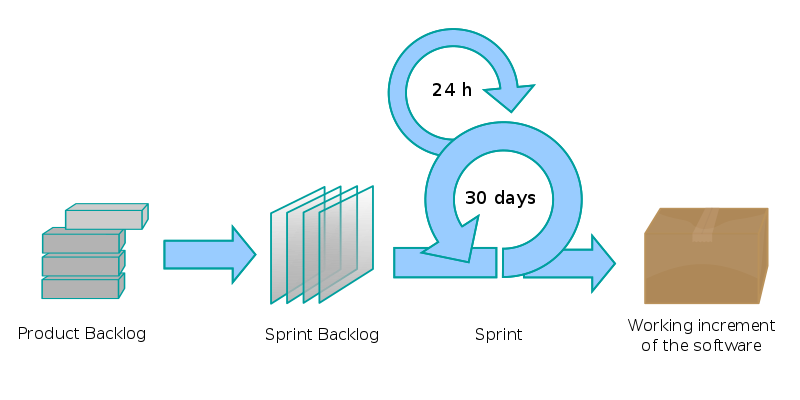
  • SCRUM - is an agile project management process as represented with the screenshot below:

    • Product Owner (not shown) - same as product management team
    • Product backlog - requirements gathered from customers or partners. It is comprised of Epics (a big story) or stories. A story is a requirement adding value by itself. 
    • A story can be split into one or more stories during the "User Story Workshop" meetings (similar to functional specification review meetings where development team, product management and testers meet to understand the requirements more clearly and the outcome of this meeting is: more new stories which can fed back to product backlog, acceptance tests document which is written to test all possible use cases and shared understanding between participants)
    • The length of a story should typically be small (roughly 2 days worth or so)
    • Multiple stories are then taken up in a sprint (roughly about a month long) phase in which those stories are implemented 
    • The progress of sprint is measured using a burndown chart (which is a chart of the work remaining to be done against time)
    • Size of team = 1 to 14 people
    • The team can be comprised of some developers who will write code and automated unit tests, testers who will create the acceptance test document and automate those acceptance tests and also do some exploratory testing towards the end of the sprint
    • A nice video of Ken Schwaber on SCRUM @ Google.
  • Tools:
    • Continuous integration : Hudson/ Cruise Control
    • Unit test: TestNG
    • Acceptance test: Squish/ QFTest
The above notes is mostly what i could glean from the training i attended though it may not still summarize the details well enough or may have captured some details inaccurately.

Friday, July 20, 2012

Meeting with James Gosling (father of Java)


(Myself with James Gosling)

(Having a beer at the event)

(James presenting his talk)

Yesterday (07/19/2012) i went to attend the “Bay area all JUG event at Oracle with James Gosling” where all the JUGs (Java User Groups) in the bay area had gathered for an evening of socializing and to hear to James Gosling speak at the Oracle campus in Santa Clara.


The evening started with a casual social gathering in the 4030 George Sellon Cir, Santa Clara, CA campus of Oracle (erstwhile Sun campus) where dinner was served and Java developers from all over bay area (around 200+) interacted with each other, talked about Java in general, heard James talking about his work in Liquid Robotics or posed for a Java Music Video which was in the making on site. The camper chairs with Java logo on them were souvenirs which people were asked to take with them if they wanted to – so almost everyone promptly got up from their chairs and folded them and put them in their cars :) – this was funny but i too picked mine – it was souvenir after all.


Then we went into the hall where the presentations were held. There were 2 presentations:


This presentation was on running Java SE embedded on Raspberry Pi (a small form factor computer, which can run Linux off of a SD card, has 126MB/256MB RAM, ARM7 processor and HDMI, USB, RJ45 slots). A demo was show of a small Java web server running on the RPi device which was serving the system information.

  • "Robots and Oceans and Whales, Oh My!" by James Gosling

This presentation by James Gosling was about the Wave Glider robot of Liquid Robotics company which is an unmanned maritime vehicle (UMV) that uses the up and down wave motion in the ocean to move forward. It is designed to support variety of sensors on-board. It can either be stationed at one place for say weather measurement or be mobile. It transmits data to shore stations via Iridium satellite communications. The satellite communication is very expensive ($1/1Kb of data) so the focus of James’ work is in optimizing the data communication between these nodes in the ocean and the shore stations. James showed the work he was doing using the NASA World Wind Java SDK to plot the path of these robotic nodes on the world globe (NASA world wind is a nice example of an advanced Java Swing application for displaying geographic data). He has built a JMS-ish style publish-subscribe asynchronous communication channel between the nodes which is also authenticated (using Open AM and Open DS directory service) so that only interested nodes which have subscribed for say data from the weather sensor and have successfully authenticated to the robot will be provided access to the data. The business model is less about selling the robots themselves and more about selling the data from the robots to the various interested parties (Commercial ships, Oil Rig etc).


In short, both the presentations were quite interesting to me and i ended up buying the Raspberry Pi kit to get my feet wet in Java SE embedded programming.

Monday, June 18, 2012

Eclipse cut, copy & paste key bindings not working

The key bindings for cut/copy and paste did not always work in Eclipse Java editor in my Eclipse Indigo installation.

The fix for this was to go to Window > Preferences > General > Keys and unbind the key bindings for Cut, Copy and Paste commands.

After this, it works fine.

I found this solution mentioned in https://bugs.eclipse.org/bugs/show_bug.cgi?id=368354.

Wednesday, April 11, 2012

vCenter Inventory Service Tune Up

I noticed that the wrapper.log file (typically found in C:/ProgramData/VMware/Infrastructure/Inventory Service/Logs/wrapper.log) for the VMware Inventory Service (which gets installed with the vCenter server) can keep growing by default and so if you are not interested in wrapper.log file to keep growing forever and thus impacting eventually the vCenter server itself (since it will fill up the entire disk space) then change the wrapper.conf to have a rolling file instead of a growing log file.

#********************************************************************
# Wrapper Logging Properties
#********************************************************************


# Log file to use for wrapper output logging.
wrapper.logfile=C:/ProgramData/VMware/Infrastructure/Inventory Service/Logs/wrapper.log

# Format of output for the log file. (See docs for formats)
wrapper.logfile.format=LPTM

# Log Level for log file output. (See docs for log levels)
wrapper.logfile.loglevel=INFO

# Maximum size that the log file will be allowed to grow to before
# the log is rolled. Size is specified in bytes. The default value
# of 0, disables log rolling. May abbreviate with the 'k' (kb) or
# 'm' (mb) suffix. For example: 10m = 10 megabytes.
wrapper.logfile.maxsize=100m

# Maximum number of rolled log files which will be allowed before old
# files are deleted. The default value of 0 implies no limit.
wrapper.logfile.maxfiles=2


Wednesday, April 04, 2012

Resolution for “No buffer space available (maximum connections reached?): JVM_Bind” issue

I hit this issue recently which occurred on only one windows 7 host. The error was caused by this hard to guess reason (http://support.microsoft.com/kb/196271). The default number of ephemeral TCP ports is 5000. Sometimes this number may become less if the server has too many active client connections due to which the ephemeral TCP ports are all used up and in this case no more can be allocated to a new client connection request resulting in the below issue (for a Java application):
Caused by: java.net.SocketException: No buffer space available (maximum connections reached?): JVM_Bind
    at java.net.PlainSocketImpl.socketBind(Native Method)
    at java.net.PlainSocketImpl.bind(PlainSocketImpl.java:365)
    at java.net.Socket.bind(Socket.java:577)
    at com.sun.net.ssl.internal.ssl.BaseSSLSocketImpl.bind(BaseSSLSocketImpl.java:95)
    at com.sun.net.ssl.internal.ssl.SSLSocketImpl.bind(SSLSocketImpl.java:45)
    at com.sun.net.ssl.internal.ssl.SSLSocketImpl.<init>(SSLSocketImpl.java:399)
    at com.sun.net.ssl.internal.ssl.SSLSocketFactoryImpl.createSocket(SSLSocketFactoryImpl.java:123)
    at org.apache.commons.httpclient.contrib.ssl.EasySSLProtocolSocketFactory.createSocket(EasySSLProtocolSocketFactory.java:183)
    at org.apache.commons.httpclient.HttpConnection.open(HttpConnection.java:707)
    at org.apache.commons.httpclient.MultiThreadedHttpConnectionManager$HttpConnectionAdapter.open(MultiThreadedHttpConnectionManager.java:1361)
    at org.apache.commons.httpclient.HttpMethodDirector.executeWithRetry(HttpMethodDirector.java:387)
    at org.apache.commons.httpclient.HttpMethodDirector.executeMethod(HttpMethodDirector.java:171)
    at org.apache.commons.httpclient.HttpClient.executeMethod(HttpClient.java:397)


The resolution is to open the registry editor and locate the registry subkey: HKEY_LOCAL_MACHINE\SYSTEM\CurrentControlSet\Services\Tcpip\Parameters and add a new entry as shown below:

Value Name: MaxUserPort
Value Type: DWORD
Value data: 65534
That’s it! Thanks to Daniel Baktiar for his post.

Update 6/14/2012:
Microsoft has a hot fix to resolve this issue for Win2K8 R2 and Win7: http://support.microsoft.com/kb/2577795

Saturday, February 11, 2012

Clearcase code merge on Unix

Following are the steps to perform a merge from branch1 (for say release1.0) to branch 2 (for say release 2.0) in clearcase on a Linux system:
1. Create a view to branch 2 where you want to merge the code to and set to the view. Then launch clearcase merge manager GUI.
$ clearmrgman
2. The merge manager wizard will prompt for the following:
    • Step 1 - Specify the dynamic or path to snapshot view
    • Step 2 - Select the elements you want to consider for merge
    • Step 3 - Select where you want to merge from by branch name, label name or from another clearcase view.
    • Step 4 – merge options like:
      • auto merge for directories – default yes
      • auto merge files in the directories – default yes
      • follow VOB symbolic links – default no
3. Once the merge completes, if there are any merge errors requiring manual resolution then those files are shown and one by one you can resolve them.
4. Once the merge is completed, all files modified, added or unloaded due to merge are in checked out state and require check in. So check in the files.
For more details, please refer the following:

Tuesday, February 07, 2012

A clearcase pre-code delivery check script

The following script finds all hijacked or checked out files recursively in the directories starting from the current working directory and dumps the data in an output.txt file.
@echo off
set output=c:\output.txt
echo Pre Delivery script started @ %TIME%
if exist "%output%" del "%output%"
echo List of Hijacked files in %CD%.  >> "%output%"
echo _______________________ >> "%output%"
echo Finding hijacked files. Please wait...
cleartool ls -recurse | findstr "hijacked" >>c:\output.txt
echo List of View Private files in %CD%. >> "%output%"
echo Finding view private files. Please wait...
echo ___________________________ >> "%output%"
cleartool ls -r -s -view_only| findstr /V ".contrib \\dist\\ \\build\\ dist .keep .class" >> "%output%"
start notepad "%output%"
echo Pre Delivery script completed  @ %TIME%. Please refer c:\output.txt file for hijacked and view private files

Wednesday, February 01, 2012

Converting from RHEL 6 to Centos 6.2

I recently installed RHEL 6 (workstation) but had not yet purchased an RedHat Network subscription when i learned that i can change it to Centos very easily and then updates will work off of Centos repository. So i upgraded RHEL 6 to Centos 6.2 with the following commands executed in order:


yum clean all
mkdir ~/centos
cd ~/centos
wget http://mirror.centos.org/centos/6.2/os/x86_64/RPM-GPG-KEY-CentOS-6
wget http://mirror.centos.org/centos/6.2/os/x86_64/Packages/centos-release-6-2.el6.centos.7.x86_64.rpm
wget http://mirror.centos.org/centos/6.2/os/x86_64/Packages/yum-3.2.29-22.el6.centos.noarch.rpm
wget http://mirror.centos.org/centos/6.2/os/x86_64/Packages/yum-utils-1.1.30-10.el6.noarch.rpm
wget http://mirror.centos.org/centos/6.2/os/x86_64/Packages/yum-plugin-fastestmirror-1.1.30-10.el6.noarch.rpm
rpm --import RPM-GPG-KEY-CentOS-6
rpm -e --nodeps redhat-release-server
rpm -e yum-rhn-plugin rhn-check rhnsd rhn-gnome-setup rhn-setup
rpm -Uhv --force *.rpm
yum upgrade
reboot
 This above is based on http://yo61.com/upgrading-rhel-6-2-to-centos-6-2.html blog post.

Wednesday, January 04, 2012

foobar2000 - A pretty nice music player for windows

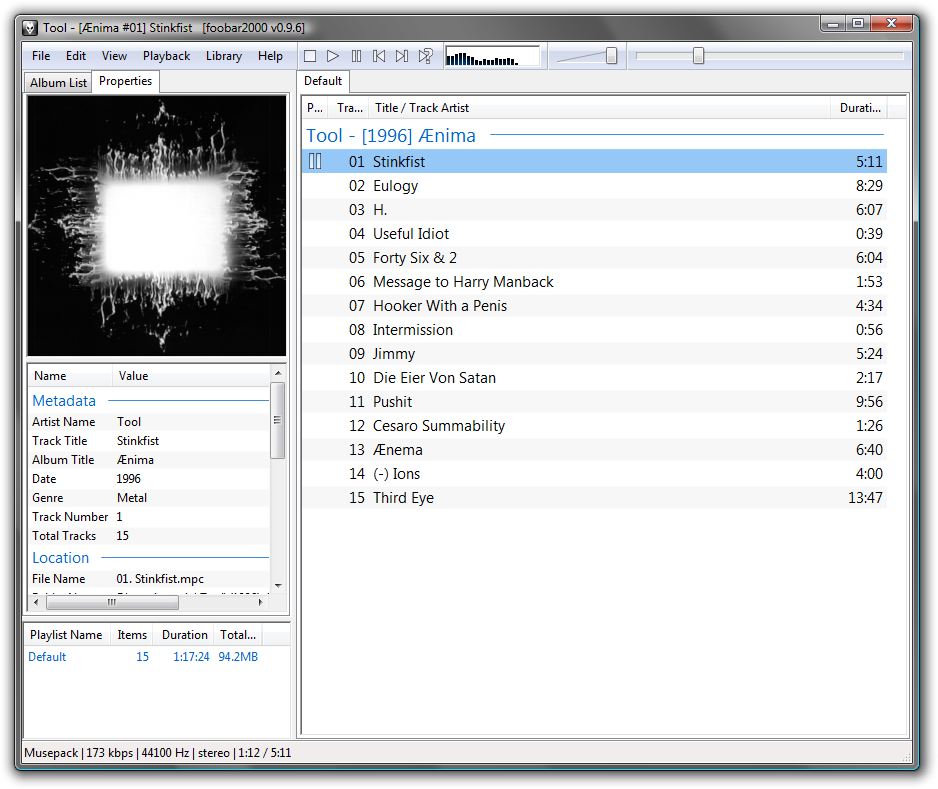
foobar2000: I discovered today foobar2000 and have used it for almost the whole day today and i must say that its very light and fast (you really can feel it is so). Highly recommended - go check it out.


Tuesday, January 03, 2012

Batch script to change Java Home between different JDKs

I recently happened to be working on multiple releases with some of them requiring the code to be compiled with JDK 6 whereas the more recent releases requiring code to compile with JDK 7. So i wrote up the following batch script to make the job of switching between the 2 JDKs easier. Before i run my ant build script i run the below script to set to ‘7’ for JDK 7 or ‘6’ for JDK 6.

@ECHO OFF
echo %1%
 
if "%1"== "" ( 
    echo "Syntax: javahome 7 or 6" 
    Goto :end
) 
if "%1" == "7" (
    echo "Setting JDK 7"
    
    set JAVA_HOME=C:\Program Files\Java\jdk1.7.0_01
    GOTO :printver
) 
 
if "%1" == "6" (
    echo "Setting JDK 6"
    
    set JAVA_HOME=C:\Program Files\Java\jdk1.6.0_23
    GOTO :printver
)
 
:printver
echo %JAVA_HOME%
 
set NEW_PATH=%PATH%
FOR /F "delims=;" %%P IN ("%PATH%") DO (
    @ECHO path = %%~P
 
)
 
 
set PATH=%JAVA_HOME%\bin;%NEW_PATH%
echo %PATH%
 
java -version
:end

Sunday, December 25, 2011

Some new movie reviews

My family has been away for last 2 weeks in which i had the free-time to catch up on some of the new movie releases. Here are the ones i watched this holiday season, in order:

  1. Hugo (3D) -  Throughout his extraordinary career, Academy Award-wining director Martin Scorsese has brought his unique vision and dazzling gifts to life in a series of unforgettable films. This holiday season the legendary storyteller invites you to join him on a thrilling journey to a magical world with his first-ever 3-D film, based on Brian Selznick's award-winning, imaginative New York Times best-seller, "The Invention of Hugo Cabret." Hugo is the astonishing adventure of a wily and resourceful boy whose quest to unlock a secret left to him by his father will transform Hugo and all those around him, and reveal a safe and loving place he can call home.
  2. Sherlock Holmes 2 - A game of shadows -  Sherlock Holmes (Robert Downey Jr.) has always been the smartest man in the room...until now. There is a new criminal mastermind at large-Professor Moriarty (Jared Harris)-and not only is he Holmes' intellectual equal, but his capacity for evil, coupled with a complete lack of conscience, may actually give him an advantage over the renowned detective. When the Crown Prince of Austria is found dead, the evidence, as construed by Inspector Lestrade (Eddie Marsan), points to suicide. But Sherlock Holmes deduces that the prince has been the victim of murder-a murder that is only one piece of a larger and much more portentous puzzle, designed by Professor Moriarty. The cunning Moriarty is always one step ahead of Holmes as he spins a web of death and destruction-all part of a greater plan that, if he succeeds, will change the course of history. 
  3. The girl with the dragon tattoo -  The Girl with the Dragon Tattoo is the first film in Columbia Pictures' three-picture adaptation of Stieg Larsson's literary blockbuster The Millennium Trilogy. Directed by David Fincher and starring Daniel Craig and Rooney Mara, the film is based on the first novel in the trilogy, which altogether have sold 50 million copies in 46 countries and become a worldwide phenomenon.
  4. Adventures of Tintin -  Paramount Pictures and Columbia Pictures Present a 3D Motion Capture Film The Adventures of Tintin directed by Steven Spielberg from a screenplay by Steven Moffat and Edgar Wright & Joe Cornish. Starring Jamie Bell as Tintin, the intrepid young reporter whose relentless pursuit of a good story thrusts him into a world of high adventure, and Daniel Craig as the nefarious Red Rackham.
  5. Mission Impossible 4 - Ghost Protocol -  This is not just another mission. The IMF is shut down when it's implicated in a global terrorist bombing plot. Ghost Protocol is initiated and Ethan Hunt and his rogue new team must go undercover to clear their organization's name. No help, no contact, off the grid. You have never seen a mission grittier and more intense than this.
All were nice movies (or else i would not have gone to watch them :)) but i liked the "Adventures of Tintin" the most, followed by MI4 and Sherlock holmes, followed by Hugo and then Girl with the dragon tattoo. The problem with the GWTDT is it is not as well made as the sweedish version of the same movie (which i had watched before the english one).

Monday, December 19, 2011

VMware vSphere Performance Manager APIs

PerfCounterInfo

Figure 1 – PerfCounterInfo

PerfInterval

Figure 2 - PerfInterval

Performance Provider

1. A "performance provider" (PerfProviderSummary) is any managed object that generates utilization or other performance metrics.

2. Performance providers include managed entities, such as hosts, virtual machines, compute resources, resource pools, datastores, and networks. Performance providers also include physical or virtual devices associated with these objects, such as virtual host-bus adapters and network-interface controllers (NICs)

3. Each performance provider—the instrumented device or entity—has its own set of counters that provides metadata about its available metrics. Each counter has a uniquekey, referred to as the counterId.

Performance Counter

4. Counters are organized by groups of finite system resources, such as memory, CPU, disk, and so on.

5. PerfCounterInfo data object, shown in Figure 1, represents a performance counter.

Name

Type

Description

groupInfo

ElementDescription

The group of the performance counter with its label and summary details.

Key

Int

A system-generated number that uniquely identifies the counter in the context of the system. The performance counter ID.

Level

int

1..4, 1 is default. Higher the setting more data is collected by vCenter. See below for details. Note this is only applicable for vCenter and not ESX host.

nameInfo

ElementDescription

Counter name

perDeviceLevel

Int (since 4.1)

>= level.

rollupType

PerfSummaryType

One of average, latest, max, min, none, summation

statsType

PerfStatsType

One of absolute, delta or rate

unitInfo

ElementDescription

Unit for values of performance counter.

6. The performance counter can be represented by the following dotted string notation:

[group].[counter].[rollupType]

Example, disk.usage.average

7. Here are a list of four levels and what counters are included:

a. Level 1:  includes basic metrics: average usage for CPU, memory, disk, and network; system uptime, system heartbeat, and DRS metrics. It does not include statistics for any device.

b. Level 2: includes all counters with rollup types of average, summation, and latest for CPU, memory, disk, and network; system uptime, system Heartbeat, and DRS metrics. It does not include any statistics for device either.

c. Level 3: includes all metrics (including device metrics) for all counter groups except these with rollup types of maximum and minimum rollup types.

d. Level 4: includes all metrics supported by VirtualCenter, including maximum and minimum rollup types.

Performance Metric

8. The cpu.usage.average is a performance counter for average CPU utilization. When the counter is collected on CPU No. 1 of a host, a performance metric is formed. The performance metric is represented by PerfMetricId data object which consists of two parts:

a. counterId: The integer that identifies the performance counter.

b. instanceId: The name of the instance such as “vmnic1” or “vmhba0:0:0”.

Performance Interval

9. The interval has to be longer than the sampling interval, which can be found as refreshRate in the PerfProviderSummary data object returned by queryPerfProviderSummary() method, normally 20 second. For VirtualCenter Server systems, instances of this data object are referred to as “historical intervals” because they control how data collected from the ESX systems will be aggregated and stored in the database.

10. vCenter default setting is level 1 and it retains sampled stats data as follows:

· 5-minute samples for the past day

· 30-minute samples for the past week

· 2-hour samples for the past month

· 1-day samples for the past year

11. PerfInterval is explained below:

Name

Type

Description

Enabled

Boolean

If disabled vCenter will not collect performance data for that interval or higher intervals. For example, disabling the "Past Month" interval disables both "Past Month" and "Past Year" intervals. The system will aggregate and retain performance data using the "Past Day" and "Past Week" intervals only.

Key

Int

Id for interval

Length

Int

Seconds that the stats corresponding to this interval are kept on system

Level

Int

1..4. higher the level more data is collected.

Name

String

Name of historical interval. Example, “Past Day”, “Past Week” etc.

samplingPeriod

Int

Number of seconds that data is sampled for this interval. The real-time samplingPeriod is 20 seconds.

Default properties for the four built-in historical intervals include:

KEY

SAMPLINGPERIOD

LENGTH

NAME

LEVEL

ENABLED

1

300

86400

Past day

1

true

2

1800

604800

Past week

1

true

3

7200

2592000

Past month

1

true

4

66400

31536000

Past year

1

true

12. In general, you should avoid changing the intervals as much as possible except the levels.

Real time vs historical performance statistics:

a. Real time stats collected at 20 secs sampling interval and kept for a length of 1 hour.

b. These real time samples are then processed to generate historical performance stats.

c. ESX only maintains 5 mins interval historical stats for one day length. vCenter does more aggregation and maintains stats for longer durations.

Important references:

1. vSphere SDK 5.0 reference on Performance Manager - http://vijava.sourceforge.net/vSphereAPIDoc/ver5/ReferenceGuide/vim.PerformanceManager.html

2. A decent introduction to performance manager APIs: http://www.doublecloud.org/2010/03/fundamentals-of-vsphere-performance-management/

Friday, September 23, 2011

Installing VMware vCenter Server 4.1

Installing VMware vCenter Server 4.1:

Very helpful instructions with screenshot to walk you through the entire vCenter server 4.1 installation with a SQL Server 2008 (not the express edition one).

'via Blog this'

Wednesday, June 29, 2011

VMware vSphere 4 Networking Essentials

1. vSwitch similarities to a physical L2 switch:

  • A vSwitch functions at Layer 2,
  • maintains MAC address tables,
  • forwards frames to other switch ports based on MAC address,
  • supports VLAN configuration,
  • is capable of trunking using IEEE 802.1q VLAN tags, and
  • is capable of establishing port channels.

2. vSwitches are configured with a specific number of ports: 8, 24, 56, 120, 248, 504, or 1016. VMKernel reserves 8 ports for its own use.

3. Changing the number of ports on a vSwitch requires a reboot of ESX/ESXi host.

4. vSwitch dissimilarities to physical L2 switch:

  • Does not support dynamic negotiation protocols for establishing 802.1q trunks or port channels like DTP (Dynamic Trunking Protocol) or PAgP (Port Aggregation Protocol).
  • A vSwitch cannot be connected to another vSwitch thereby eliminating a potential looping configuration. Because there is no possibility of looping, the vSwitches do not run Spanning Tree Protocol (STP).
  • A vSwitch authoritatively knows the MAC addresses of the virtual machines connected to that vSwitch so there is no need to learn MAC addresses from the network.
  • Traffic received by a vSwitch on one uplink is never forwarded out another uplink. So a vSwitch cannot be used as a transit path between 2 physical switches for example, because traffic on one uplink won’t be forwarded out another uplink.

5. Following 3 types of ports and port groups can be configured on a vSwitch:

  • Service console port
  • VMKernel port
  • Virtual Machine port group

All of the above types can be represented by one table/type:

std_vswitch_portgroup - model's VMKernel Ports, Service Console Ports and VM Port groups

  • · network_label
  • · vlan_id
  • · type - one of vmportgroup (0), vmkernel(1), serviceconsole(2)
  • · vmkernel_port_operations (bitmask - values) - only applicable for VMKernel ports

000 - Use this portgroup for iSCSI/NAS traffic

001 - Use this portgroup for VMotion

010 - Use this portgroup for fault tolerance logging

100 - Use this portgroup for management traffic - only applicable for ESXi

6. vSphere client combines the creation of vSwitch with creation of new ports or port groups. vSphere client does not ask about creating a new vSwitch, but rather what type of port or port group to create (connection types – Virtual Machine, VMKernel or Service Console are the options).

7. Unlike ports or port groups, uplinks are not necessarily required in order for a vSwitch to function. VMs connected to a vSwitch without any uplinks can communicate with each other but cannot communicate with VMs on other vSwitches or physical systems. Such a configuration is known as an “Internal-only vSwitch”. Communication between VMs connected to an internal-only vSwitch takes place entirely in software and happens at whatever speed the VMKernel can perform the task.

8. VMs connected to an internal-only vSwitch are not VMotion capable. But if the VM is disconnected from the internal-only vSwitch, VMotion will succeed if all other requirements have been met.

9. A vSwitch can also be bound to multiple physical NICs – this configuration is called NIC team. This takes advantage of load distribution and redundancy.

10. vSwitch associated with a physical NIC provides VMs with the amount of bandwidth the physical NIC is configured to support.

11. A single physical NIC cannot be associated with multiple vSwitches.

12. Max number of physical NICs on a ESX/ESXi host is 32 of which only 4 can be 10 Gbps adapters.

13. Service Console ports:

  • ESX supports up to 16 service console ports.
  • At least one service console port is required to exist on any one vSwitch on an ESX host.
  • We will discover but not perform any create/update/delete operations for this port type.

14. VMKernel ports:

  • Provide network access for the VMKernel’s TCP/IP stack (which is separate and independent from the Service Console TCP/IP stack).
  • VMKernel ports are used for VMotion process, iSCSI/NAS access and VMware FT.
  • With ESXi hosts, VMKernel ports are also used for management.
  • A VMKernel port comprises of 2 components:
    • A VMKernel port on a vSwitch
    • A VMKernel NIC – vmknic

e. The vmknic is configured with the interface IP address in the process of creating the VMKernel connection type in vSphere client. The IP address should be a valid IP for the network to which the physical NIC is connected to. One can optionally provide the default gateway if VMKernel NIC is required to reach remote subnets.

15. VLAN

  • a. IEEE 802.1Q Tagging – marking traffic as belonging to a particular VLAN. VLAN tag (aka VLAN ID) is value between 1 and 4094 which unique identifies the VLAN across the network.
  • b. VLANs are handled by configuring different port groups within a vSwitch. A port group can be associated to only 1 VLAN at a time, but multiple port groups can be associated with a single VLAN.
  • Figure 16 - Configuring VLAN on Port groups of a vSwitch
  • c. To make VLANs work properly with a port group, the uplinks for the vSwitch must be connected to a physical switch port configured as a trunk port. A trunk port understands how to pass traffic from multiple VLANs simultaneously while also preserving the VLAN IDs on the traffic. So the physical switch passes the VLAN tags up to the ESX server, where the vSwitch tries to direct the traffic to a port group with that VLAN ID configured.
  • d. The default native VLAN is VLAN ID 1. This is untagged VLAN ID meaning the switch port will strip this native VLAN id from the traffic as they pass. If you want to pass traffic on VLAN 1 to ESX server, then you need to maintain the tagging in the traffic and so you need to configure another VLAN id as native default VLAN. So an untagged VLAN (default native VLAN) can also be any id between 1 and 4094.
  • e. A good convention to follow while naming port group or port network label is: VLANXXX-Network Description. For example, VLAN11-IPStorage.
  • f. Although VLAN reduce the cost of constructing multiple logical subnets by separating the network segments logically but still all traffic runs on the same physical network underneath. For bandwidth-intensive network operations this disadvantage of shared physical network might outweigh the scalability and cost savings of a VLAN.

16. NIC Teaming

  • a. Uplink is a physical adapter bound to the vSwitch and connected to physical switch.
  • b. NIC teaming involves connecting multiple adapters to single vSwitch. It provides redundancy and load balancing of network communications to Service Console, VMKernel and virtual machines.
  • Figure 17 - NIC Teaming
  • c. As seen in figure above, both of the vSwitches have 2 uplinks and each uplink connects to a different physical switch.
  • d. ESX/ESXi can have a max of 32 uplinks and these uplinks can be spread across multiple vSwitches or all tossed into a NIC team on one vSwitch.
  • e. Building a functional NIC team requires that all uplinks be connected to physical switches in the same broadcast domain. If VLANs are used then all the switches should be configured for VLAN trunking and the appropriate subset of VLANs must be allowed across the VLAN trunk.
  • f. The load balancing feature of NIC teaming does not function like the load balancing feature of advanced routing protocol and hence is not a product of identifying the amount of traffic transmitted through a network adapter and shifting traffic to equalize data flow through all available adapters. Rather the load balancing algorithm for NIC teams in a vSwitch is a balance of the number of connections – not amount of traffic. NIC teams on a vSwitch can be configured with one of following 3 policies:
    • i. vSwitch port based load balancing (default)
    • This policy setting ensures that network adapter connected to a vSwitch port will consistently use the same physical network adapter. In the event one of the uplinks fails, the traffic from failed uplink will failover to another physical adapter.
    • This setting is best used when number of virtual network adapters is greater than number of physical network adapters. Link aggregation using 802.3ad teaming is not supported with this and MAC based load balancing policies.
    • ii. Source MAC based load balancing
    • It has same limitations as previous method – it’s also static mapping of vNIC MAC to a pNIC. Traffic originating from a vNIC will always go through the same physical NIC in this approach (Same as previous).
    • iii. IP hash based load balancing (out-IP policy)
    • It uses source and destination IP addresses to determine the physical network adapter for communication. This allows traffic originating from a single vNIC to go over multiple physical NICs when communicating with different destinations.
    • This policy setting requires all physical NICs be connected to same physical switch. Also the switch must be configured for link aggregation (which can increase the throughput by combining the bandwidth of multiple physical NICs for use by a single vNIC of a VM). ESX/ESXi supports standard 802.3ad teaming in static (manual) mode and does not support LACP or PAgP.
  • g. The load balancing feature on vSwitch applies only to the outbound traffic.
  • h. Failover detection with NIC teaming can be configured to use either a link status method or a beacon probing method.
    • i. Link status method – failure of an uplink is determined by link status provided by physical network adapter. But this can only identify the link status of pNIC to edge switch and not the link status between the edge switch to an upstream switch.
    • ii. Beacon probing failover detection – included link status as well as sends Ethernet broadcast frames across all physical network adapters in NIC team which help detect upstream network connection failures as well and will force failover when STP blocks ports, when ports are configured with wrong VLAN or when a switch to switch connection has failed. When a beacon is not returned on a pNIC the vswitch triggers failover.
  • i. Failback option controls how ESX will handle a failed network adapter when it recovers from failure. Default setting is yes which means the adapter will be returned to active duty immediately upon recovery and it will replace the standby adapter that may have taken its place during the failure. Setting it to No means the recovered adapter will remain inactive until another adapter fails.
  • j. One can even use the setting “Explicit failover order” in which case traffic will move to next available uplink in the list of active adapters. If no active adapters are available then traffic will move down the list to the standby adapters.

17. vNetwork Distributed Virtual Switches:

  • a. A dvSwitch spans multiple servers instead of each server having its own set of vSwitches.
  • b. First you create a dvSwitch and you add hosts to it during or after creation.
  • c. When an additional ESX host is added to a dvSwitch, all of the dvPortgroups will automatically be propagated to the new host with the correct configuration. This is the distributed nature of the dvSwitch – as configuration changes are made via the vSphere client a vSphere server pushes those changes out to all participating hosts in the dvSwitch.
  • d. A host cannot be removed from a dvSwitch if it still has VMs connected to a dvPortgroup on that dvSwitch.
  • e. Adding dvPortgroup:
    • i. Name of dvPortgroup – unique across member hosts of dvSwitch.
    • ii. Number of ports: 128 default, max configurable value is 8192.
    • iii. VLAN Type:
      • 1. None – dvPortgroup will receive only untagged traffic
      • 2. VLAN – dvPortgroup will receive tagged traffic and uplinks must connect to switch ports configured as VLAN trunks
      • 3. VLAN Trunking – dvPortgroup will pass VLAN tags up to guest OS on any connected VMs
      • 4. Private VLAN

18. FAQ:

  • a. Can we have vNIC created without portgroup association? NO - API requires you to specify an existing portgroup while creating vNIC.
  • b. You can assign any name to vswitch - for eg. 'ViMaster Switch'
  • c. Standard vSwitch Port group name is unique within a host
  • d. Hybrid deployments (vDS + vSS) is a supported deployment scenario. If vCenter fails then you won’t be able to manage your vDS so it is recommended that we use vSS for at least the VMKernel and Service Console connections. One can have the VM port groups on vDS though.
  • e. We can assign a virtual hard disk carved out of a VMFS datastore over an iSCSI LUN to a VM with no network card (vnics).
  • f. For software iSCSI initiator we can tell the vmknic interface being used by identifying which iscsi target is in the same subnet as the vmknic interface.
  • g. For hardware iSCSI initiator no vmkernel port needs to be configured and it will show up as a normal FCHBA (Storage adapters) in vSphere client. The ip address will be configured on the HBA directly.

Tuesday, June 14, 2011

Book Review: The Kite Runner


I listened to the audio book “The Kite Runner” read by the author Mr. Khaled Hosseini. This book has a very strong story line to keep the reader’s attention occupied. I liked the story and following are some thoughts on the book:
1. Relation between Amir and Hassan – the loyalty and unconditional devotion which Hassan has for Amir speaks for the mindset that society can impose on an individual of lower rank that such an individual can never come out of. In spite of Amir’s cowardly manners Hassan never blames him and even accepts the false charges of being a thief just so that Amir is not caught red handed was quite touching.
2. The way Hazara community was treated in Afghanistan or the Shudras were treated in India or the Jews were treated by Nazis is a fact that humanity should never forget just so that it never repeats those mistakes in the future. It is works like this book that remind us of our abhorrent mistakes of the past and reinforces into us the realization that we should never let this repeat itself.
3. Reader gets a feel of the Afghan culture – what a pushtun clan can value, respect for elders in the society and the values like this that parents teach their children.
4. How the Afghan people were scared of the Taliban and some mentions of the atrocities that Taliban militia men conducted on  people.
5. Amir adopts Hassan’s son Sohrab and brings him to US and the problems that he faces with the consulate even though he was a US Citizen was also quite believable and something any foreign national living in US can relate to.
Overall the story was well told – its not very big book and I could complete listening to it within 4 days. Now I will like to see the movie and will update this post with how I found that later.

Saturday, May 14, 2011

Rushil learning swimming


This is the picture of Rushil learning swimming at DACA Swim Center (www.daca.org). He is 3.5yrs old now. He is enjoying the experience of swimming this summer.

Popular micro services patterns

Here are some popular Microservice design patterns that a programmer should know: Service Registry  pattern provides a  central location  fo...