Showing posts with label AJAX. Show all posts

Friday, March 23, 2007

An Events Browser - Using Displaytag and DWR


Problem:

To view application-specific events in the web browser.

Requirements:
The implementation should satisfy the following requirements:
  1. support viewing all the logged events (in a DB) with provision for specifying the number of rows per page to show in a data grid of event records.
  2. support pagination.
  3. support sorting on columns like event time, id, type etc.
  4. support exporting events data to CSV, excel etc formats.
  5. change row color to highlight rows based on severity of events.
  6. enable viewing live events instantaneously as they occur.

Solution:
The first 5 requirements are easily met by Displaytag, an excellent JSP tag library for displaying data grids. We can also enable AJAX support for displaytag data grid pagination and sorting using ajaxtags library.

We did not like the live grid type views (which may be better suited to the search examples) for our requirement as we believe the pagination with Ajax support is more appealing and common experience for users.

The last requirement is met by DWR 2.0 (which as of this writing is still being developed and the current release is 2.0 RC2). DWR 2.0 has a new feature called Reverse AJAX, which enables pushing the data from server to browser client, asynchronously.

So, we have two data grids in our UI;
  1. First data grid, displays the existing event records from the DB.
  2. Second data grid, displays the live events using DWR's Reverse Ajax feature. One can use the recently added proxy for scriptaculous Javascript effects library, to highlight the new rows as they get added to the live events data grid. Adding new rows to the HTML table is facilitated by org.directwebremoting.proxy.dwr.Util class' addRows(String elementId, String[][] data) method. The implementation can choose to route the events to all browsers or selected browser sessions only - an event routing behavior. An example on reverse ajax feature is found here (see stock ticker).
The user can navigate the existing data, paginate, sort, export and at the same time can continue to view the live events being added to the second data grid.
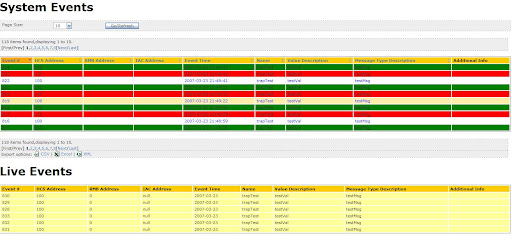
I did further work on improving the way the events displayed in the live events section above. The live events section which uses reverse ajax to asynchronously display events occurring in near real-time, is best kept separated from the archived events browser above. So the live events page can be made to show only the specified size of latest events in a queue fashion (where new incoming events replace some of the existing events (on an oldest removed first basis) when the defined window limit is reached). So if window limit is say 20 events, and we have the latest 19 events displayed so if there are 2 new events to show, we remove the last 1 event from the existing 19 and show the 20 events with the latest 2 being shown at top of the table. The window limit is a client side parameter and can be (re)set by the user. The events will need to be cached locally on the clients to be able to display the lastest on top (as addRows() API of DWR will only append to the table tbody). Also, by caching the events locally, we can easily control the window size. The idea to have a limit to the number of live events is required as we cannot just keep the events table growing forever as the user may just want to see the latest 20 or 50 or 100 or 1000 (some limited set of real time events only as he also has the archived events table to study a past event for analysis). The purpose of the live events table is to alert the operator at the time the event occurs so that he/she can do further analysis by studying the archived events or doing some data collection on the supposedly affected elements.

Thursday, July 27, 2006

Book Review : AJAX in Action

I have today completed the 1st of the 4 parts of this book and i must say that i loved reading it due to my growing interest in the AJAX methodology and the web application development, in general.

Part 1 of the book talks about what and why about AJAX, introduces the framework and toolset and the core technologies you need to know about when working on AJAX. This part is divided into 3 chapters (introducing AJAX, simple example with code and importance of refactoring the AJAX Javascript code).

Part 2 (this is where i am now in my reading) talks about the techniques to employ for coding the client and the server. Comprised of 2 chapters.

Part 3 (which i am yet to read) discusses about enhancing user experince (usability stuff that you should consider while developing AJAX application), security and performance of AJAX application. Comprised of 3 chapters.

Part 4 provides example applications using AJAX methodology like Dynamic double combo, type-ahead suggest, web portal with autosave functionality, live search using XSLT, and building a standalone RSS Feed Reader. Comprised of 5 chapters.

The reason i like this book alot is because i did not know much CSS, HTML DOM or Javascript before and there this book introduces those subject areas in a way that is relevant to the development of AJAX based application. And thats what a J2EE developer like me will require. We dont necessarily need to learn Javascript to develop libraries like Scriptaculous (i mean not like a web front end designer would want to know). All we need to know about CSS, Javascript and HTML DOM is to be able to work comfortably with those while making an AJAX application. The book has pretty good introduction to these topics and hence i have benefitted alot. The Appendix B named Javascript for object-oriented programmers is more than what i think i will need to know about the language. CSS and HTML DOM are introduced in chapter 2 and used throughout the book in the several examples thus giving one alot of room to practice. The coverage of examples using the most common scenarios where one would want to use AJAX methodology is also very nice. It also talks and demonstrates with examples, the use of different frameworks (like Rico, prototype, scriptaculous, etc) and also tell enough about the frameworks based on which you can decide which one will best suit your needs on a certain project. In short, you become educated enough to make a good decision on what framework to use for your project which can help you cut down the timeline for the project. If you are new to AJAX then do check out the book's website for a screencast by the authors on what is ajax. I just checked out on a few frameworks mentioned in the book and following are the ones which interested me most:

  • Rico: built over prototype library provides a AjaxEngine Javascript object which you can use to simplify the AJAX request/response and also provides some widgets like accordian for one.
  • DWR: Direct web remoting is an application framework which allows Java objects to expose their methods directly for AJAX requests to clients.
  • Echo2: is also an application framework which like DWR does not require you to know HTML, CSS and Javascript enabling the user interface to be created in pure Java. It provides a visual designer as an eclipse plugin using which you can layout your web forms easily and the corresponding code will be generated in Java. The SDK is open source but the eclipse plugin is not (a free trial for 30 days is available). Will write more as i read and learn more from this excellent book.

Tuesday, April 25, 2006

My tryst with AJAX

It all started with a question bank application that i was asked to build for our staffing team's use. Once an interface to add/remove/update questions to a database was created i was asked to build a web form to allow the interviewers to manage the questions they asked in an interview session together with the ratings assigned per question per candidate. Also the interface to be quick enough for the interviewer to find the right question to ask and update on the web form while conducting the telephonic interviews. AJAX seemed to answer some of the questions like not having to reload the pages thus giving a desktop application like usability to the interviewers. And i gathered that it also a hot term in the industry today. So i thought i will make use of the simple web form work as my learning platform for AJAX. I had bought the book AJAX in action sometime back but never got time enough to start reading it. About 600 pages of it can be completed in no less that 10 days. I thought its worth to invest those 10 precisious days into the learning of this interesting concept. Will post back once i have made some head way into the book.

Popular micro services patterns

Here are some popular Microservice design patterns that a programmer should know: Service Registry  pattern provides a  central location  fo...